PhotoCraft (v0.20.1) review: what works, what fails, and what our Linux test found
PhotoCraft is an image editor written from scratch in Rust that copies Photoshop's menus, shortcuts, panels and PSD format. It is the most-starred Craft app (76,300 stars on GitHub) and, by its own authors' estimate, about 45% ready for real work.
Last checked 3 Nov 2026. Independent site; not affiliated with ArtCraft or Adobe.
Hands-on: PhotoCraft 0.20.1 on Debian 13 (tested 3 and 4 Nov 2026)
Everything else on this page comes from the project's own documents. This section is the one part we measured ourselves. Test machine: a bare Debian 13.7 (trixie) X11 install with no desktop portal and no zenity, no graphics card (Mesa llvmpipe software rendering). Build: photocraft-0.20.1-linux-x86_64.AppImage (0.20.1, commit 327c4cc82, dated 3 Nov 2026), SHA-256 checked against the release's SHA256SUMS.txt, run without installing anything. We ran it twice: once on the bare install, and again on 4 Nov after adding xdg-desktop-portal, xdg-desktop-portal-gtk and zenity.
What we confirmed
- It starts on a machine with no GPU. One dialog, "Switched to CPU rendering. GPU acceleration could not continue. Your documents are unchanged.", then the normal window. The status bar read "CPU Rendering" for the whole session. Redraw was noticeably slow with CPU rendering on this machine; we did not benchmark it, so we can't put a number on it.
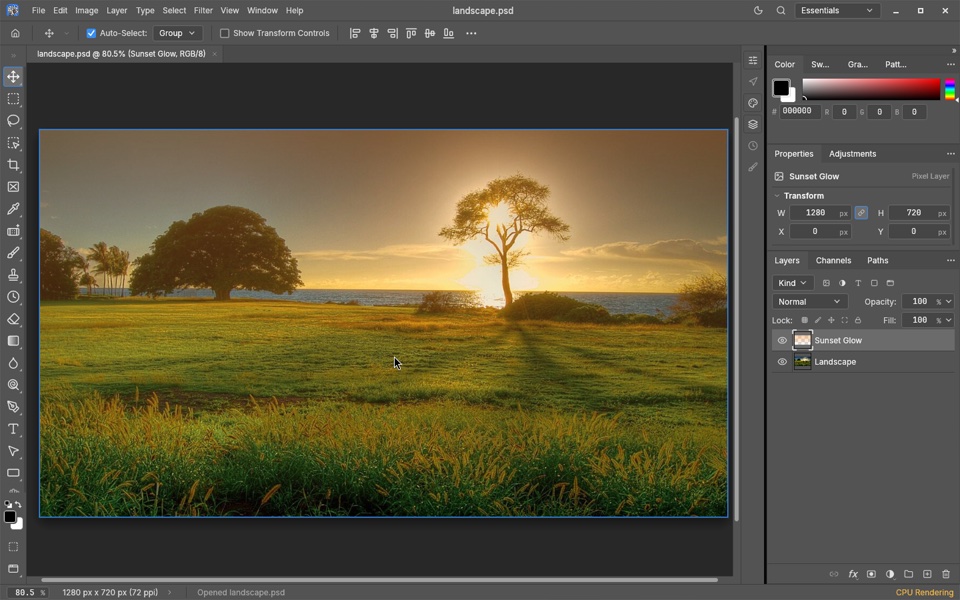
- A layered PSD opens correctly. We passed a 1280 × 720 file with two pixel layers (Landscape, Sunset Glow) to the AppImage on the command line. Both layers came in named, ordered and visible. Screenshot below.
- A PSD with a type layer opens, with a font warning. The status bar said: font 'A Garamond Pro' is not installed; text may render using a fallback face. That is the right behaviour; Photoshop does the same.
- Type tool, layer styles and filters work. New type layer, typing over the placeholder, Drop Shadow from the Layer menu and Gaussian Blur on a pixel layer all worked. Blur on the type layer asked to rasterize first, as Photoshop would.
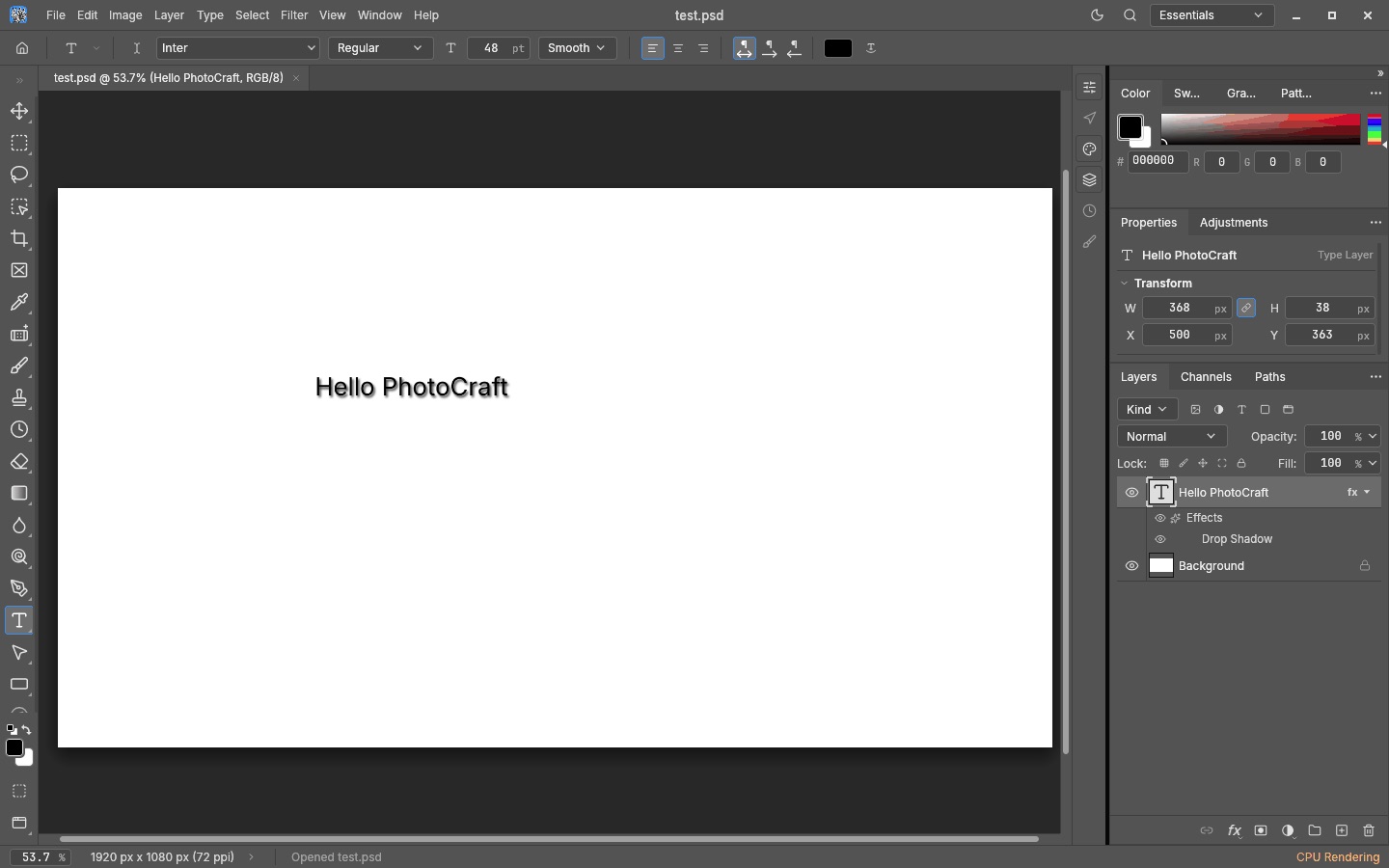
- Save As works once the portal is installed. A new 1920 × 1080 document with a type layer and a Drop Shadow saved as a 258 KB PSD. After closing and reopening it in PhotoCraft, the type layer was still editable and the Drop Shadow was still applied. Screenshot below.
- A PSD written by PhotoCraft holds up outside the app, as far as our checks go. landscape.psd re-saved as a 5.2 MB landscape-2.psd; the layer structure parses correctly in a script (same two layers), and macOS Quick Look renders it. We have no Photoshop, so whether Adobe can reopen it with editable text stays unverified.
What failed on the bare install, and what we still could not test
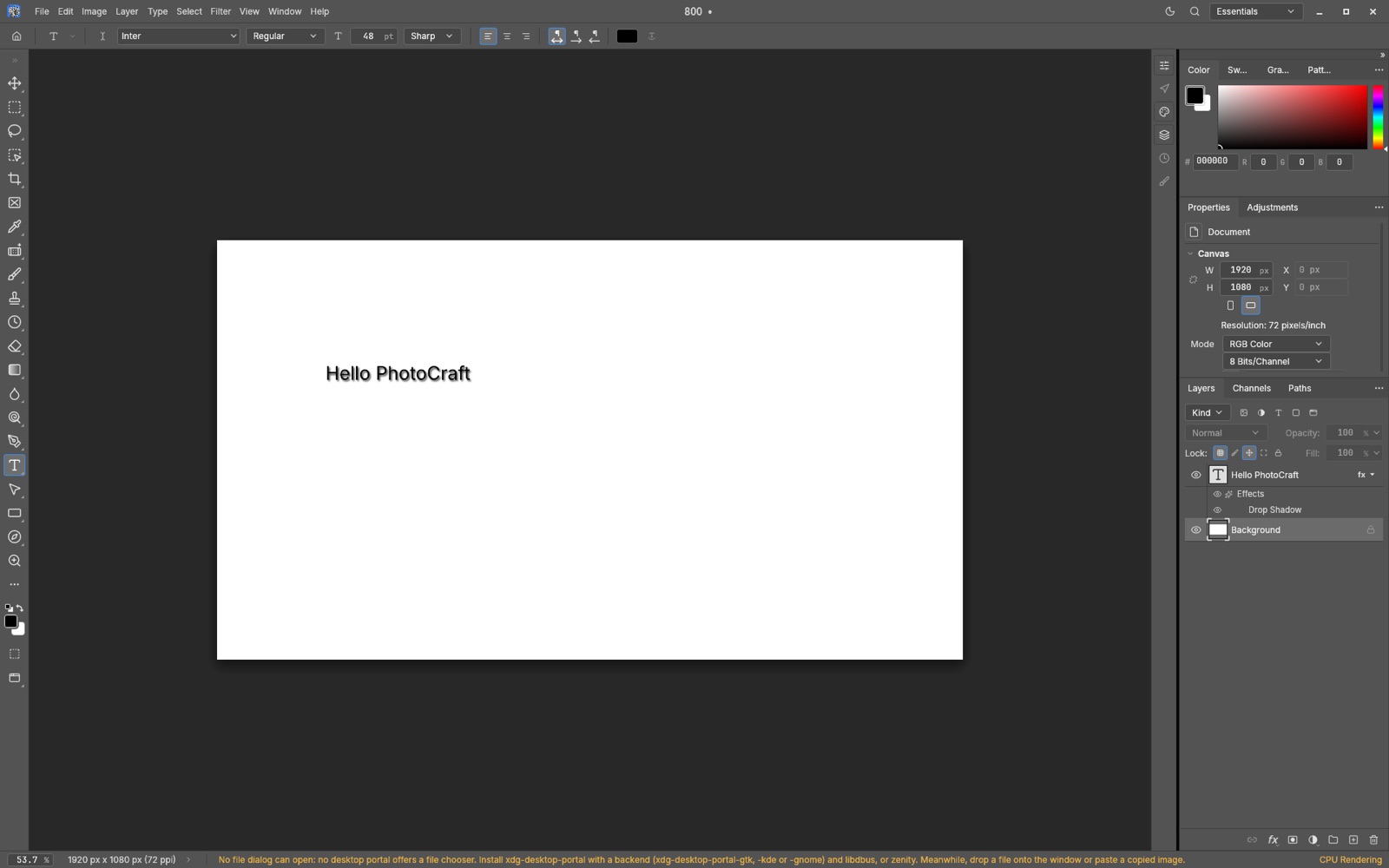
- Saving, until the portal was installed. On the bare install, Ctrl+S and Ctrl+Shift+S showed no dialog. The only sign was one line in the status bar: "No file dialog can open: no desktop portal offers a file chooser. Install xdg-desktop-portal with a backend (xdg-desktop-portal-gtk, -kde or -gnome) and libdbus, or zenity. Meanwhile, drop a file onto the window or paste a copied image." PhotoCraft has no file dialog of its own; it asks the desktop through the portal and falls back to zenity. This is a known dependency, not something unique to our machine: see issues #3354 (labwc on Void Linux, fixed by installing xdg-desktop-portal-gtk), #7129 (niri, still open) and #10826 (the same message, 2 Nov 2026, closed as a usage question). The project has not labelled it a bug: two of the three are closed. The README's Linux section does not mention the requirement either; the only places it is spelled out are that status-bar line and the issue tracker. GIMP and Krita ship their own file dialogs and do not depend on the portal; we did not retest them for this page.
- Photoshop itself. We have no copy of Photoshop, so the one test the format table most needs, opening a PhotoCraft-written PSD in Photoshop with its layers editable, is still open.
- Two small input bugs we hit on the way. The width and height fields in the New Document dialog dropped keystrokes, so we used the HDTV 1080p preset. The "Drop Shadow…" entry in the Layers panel's fx menu did nothing; the same command from the Layer menu worked. Text fields in general dropped keystrokes on this CPU-rendered machine; we saw the same in the other five Craft apps.
What this changes about the 45%
Nothing we saw contradicts the project's own 45% "ready for real work" figure, and PSD opening matched its claims. What the number does not tell you is that on Linux PhotoCraft depends on the desktop for file dialogs. On a standard GNOME or KDE install the portal is already there and you will not notice. On a bare X11 session, a minimal Wayland compositor (labwc, sway, niri) or a server-derived install, add xdg-desktop-portal plus the GTK, KDE or GNOME backend (or just zenity) before you start, or you will be able to open files from the command line and never save them. With the portal in place, open, edit and save all worked on this machine; the slow redraw is the remaining cost of running without a GPU.
What works today
- Layers and masks: layer and vector masks, groups, blend modes, opacity, clipping.
- 16 adjustment layers that stay live: Levels with a histogram, Curves per channel, Vibrance, Hue/Saturation, Black & White, Channel Mixer, Gradient Map, Photo Filter, Selective Color, Color Lookup (.cube, .3dl, .look) and more.
- Layer styles: Drop Shadow, Inner Shadow, Outer and Inner Glow, Bevel & Emboss, Satin, Stroke and the three overlays, on any layer including type.
- Type stays editable and round-trips through PSD. Shape layers and paths with boolean operations; the project reports 116 of 116 shape layers in its PSD corpus matching Photoshop pixel for pixel.
- Selections, including on-device subject and object selection (no server), 70+ live-preview filters, smart objects with smart filters, 8/16/32-bit documents in RGB, CMYK, Lab and Grayscale with ICC colour management.
- Files: PSD and PSB open and save; 307 of 309 psd-tools test files survive a round trip according to the README.
- Automation: every action is a command, so the same engine runs from the UI, a CLI, a JSON channel or an MCP server for AI agents.
What the project says is missing
From ROADMAP.md (10 Oct 2026): feature breadth ~76% (tools 53 of 68, panels 30 of 35, formats 13 of 31), ready for real work ~45%, "essentials user" ~61%. The team estimates 1,100 to 1,800 agent-hours to reach beta. The gaps it names: start-up and GPU robustness on real machines, brush and transform responsiveness, the Type tool, discoverability (fly-outs, commit buttons), opening AVIF and PDF, and PSD exchange on complex files. There is no plug-in or scripting ecosystem and no Adobe-style AI features; those "need owner decisions".
Both percentages are the project's own self-graded estimates from its ROADMAP.md (read 3 Nov 2026), not our measurements. How we work.
PhotoCraft vs Photoshop in one minute
| PhotoCraft 0.20.1 | Photoshop 2026 | |
|---|---|---|
| Price | Free, MIT or Apache-2.0 | Subscription |
| Runs on | macOS, Windows, Linux, FreeBSD, browser | macOS, Windows, iPad, web |
| Account needed | No | Yes |
| PSD / PSB | Open and save | Native |
| Generative AI | None | Firefly built in |
| Plug-ins | None | Large ecosystem |
| Maturity | Alpha, ~45% ready by its own estimate | 35 years |
Who it is for right now: people who want a free, offline editor that feels like Photoshop for everyday retouching, compositing and layered work, and who keep Photoshop or another editor around for the files that do not open cleanly. Who should wait: anyone who depends on plug-ins, actions, Camera Raw or Firefly.
How to install PhotoCraft
Option 1: the ArtCraft Launcher (recommended by the project)
The ArtCraft Launcher (v0.14.0) installs PhotoCraft and every other Craft app, picks the right build for your computer and updates them. Get it from the official apps page or the launcher's GitHub releases.
Option 2: a standalone installer
Every release on GitHub ships these files (replace 0.20.1 with the current version):
| Platform | File | Notes |
|---|---|---|
| macOS | photocraft-0.20.1-macos-universal.dmg | One file for Apple silicon and Intel. Signed and notarized, so Gatekeeper opens it without a warning. |
| Windows 10/11 (64-bit) | photocraft-0.20.1-windows-x64.msi | Installer. A -portable.zip that runs without installing is next to it. ARM64 and 32-bit builds exist too. |
| Linux | photocraft-0.20.1-linux-x86_64.AppImage | Also .deb, .rpm, .flatpak and a plain tarball, for x86_64 and ARM64. |
We never host installers. Download from GitHub or getartcraft.com only, and check the file against SHA256SUMS.txt in the same release if you want to be sure.
Questions
Is PhotoCraft really free?
Yes. It is dual-licensed MIT or Apache-2.0, runs offline and asks for no account. The ArtCraft team funds itself through the separate ArtCraft studio app's cloud credits.
Can PhotoCraft replace Photoshop?
For basic layered editing, adjustments and layer styles it already covers a lot. The authors themselves put it at about 45% ready for real work and call it alpha. Treat it as promising, not as a drop-in replacement yet.
Does PhotoCraft open PSD files?
Yes. PSD and PSB open and save, and the project reports 307 of 309 test files rendering identically after a round trip. Smart filters, rare layer kinds and very large files are the usual places where something is lost.
Is there a PhotoCraft web version?
Yes. Every release includes a photocraft-web zip, and the project says the same UI runs in the browser through WebAssembly. The desktop app is faster and has fewer limits.
Why can't PhotoCraft save files on Linux?
On most desktops it can, and we confirmed the fix: on a bare Debian 13 X11 install Save and Save As did nothing, and after installing xdg-desktop-portal, xdg-desktop-portal-gtk and zenity they worked normally (4 Nov 2026). The cause is that PhotoCraft has no file dialog of its own; it asks the desktop through xdg-desktop-portal and falls back to zenity, and if neither is installed the only sign is a status-bar line. Install the portal with the backend for your desktop (gtk, kde or gnome), or zenity, and restart PhotoCraft. The project's issue tracker has the same report from labwc and niri users (#3354, #7129).
Who makes PhotoCraft?
The ArtCraft team at Storyteller.ai, with community contributors, on GitHub as storytold/photocraft. The repository was created on 30 September 2026.